Where does application data live after a user closes the app?
Close a shopping app after adding three items to a cart, and reopen it a week later, the cart is still there. Log into a social media app on a new phone, and every post, comment, and follower is exactly where it was. None of that happens by accident. Somewhere, on a server you never see, that data is being written to a database, and read back out again every time it's needed.
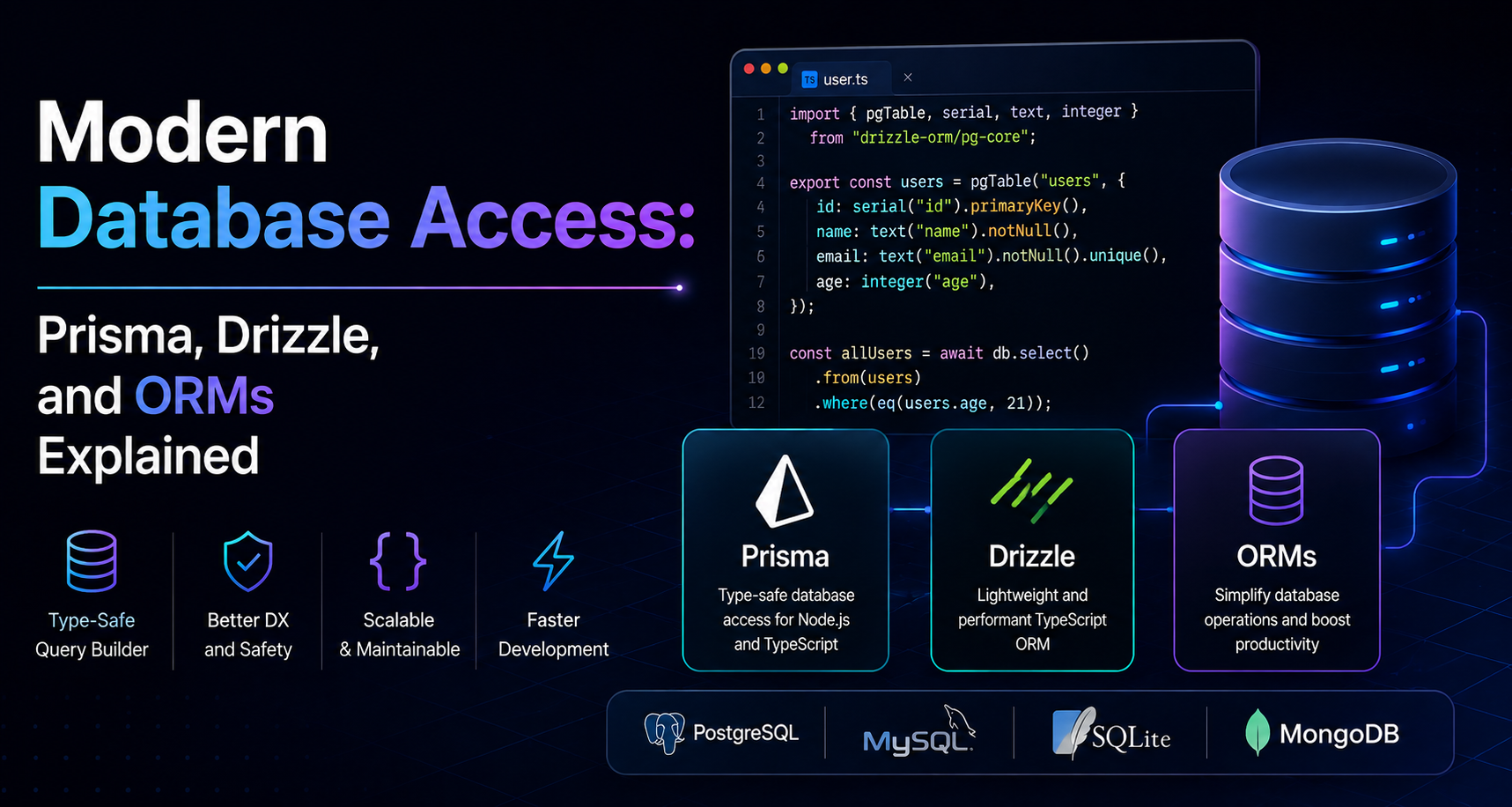
This post is about the layer of software that sits between your application code and that database, specifically, ORMs (Object-Relational Mappers), and two of the most talked-about tools in this space today: Prisma and Drizzle. Before comparing them, though, it's worth understanding why this layer exists at all.
Why Applications Need Databases?
Data needs to outlive the request:
A running application is temporary. A web server can restart, a phone can be closed, a browser tab can crash. Anything held only in memory a variable, an in-progress form, a shopping cart disappears the moment that process ends. For an application to be useful across sessions, devices, and time, its important data has to be written somewhere durable: a database.
Structured vs. unstructured data:
Not all data looks the same, and this distinction matters for how it's stored:
Structured data has a predictable shape. A user always has a name, an email, and a signup date. An order always has an amount and a status. This kind of data fits naturally into rows and columns.
Unstructured (or semi-structured) data doesn't follow a fixed shape. A product catalog where every category of item has different attributes (a book has an author; a laptop has a processor), a chat log, or a document full of free text are harder to force into a rigid table.
Most real applications have a mix of both, which is part of why different types of databases exist more on that in the next section.
Common examples of structured data:
A few entities show up in almost every application, regardless of industry:
Users — accounts, credentials, profile information
Orders — what was purchased, when, and by whom
Products — the catalog being sold or offered
Payments — transaction records tied to orders
The role of databases in modern applications:
A database isn’t just a filing cabinet. It’s expected to:
Persist data reliably, even through crashes or power loss
Enforce rules (a payment can’t exist without an order; an email must be unique)
Handle many simultaneous reads and writes without corrupting data
Retrieve exactly the information needed, quickly, even from millions of rows
That combination of durability, correctness, and speed at scale is why “just write it to a file” stops working almost immediately for any real application.
SQL vs. NoSQL Databases
Once you accept that data needs a database, the next decision is what kind.
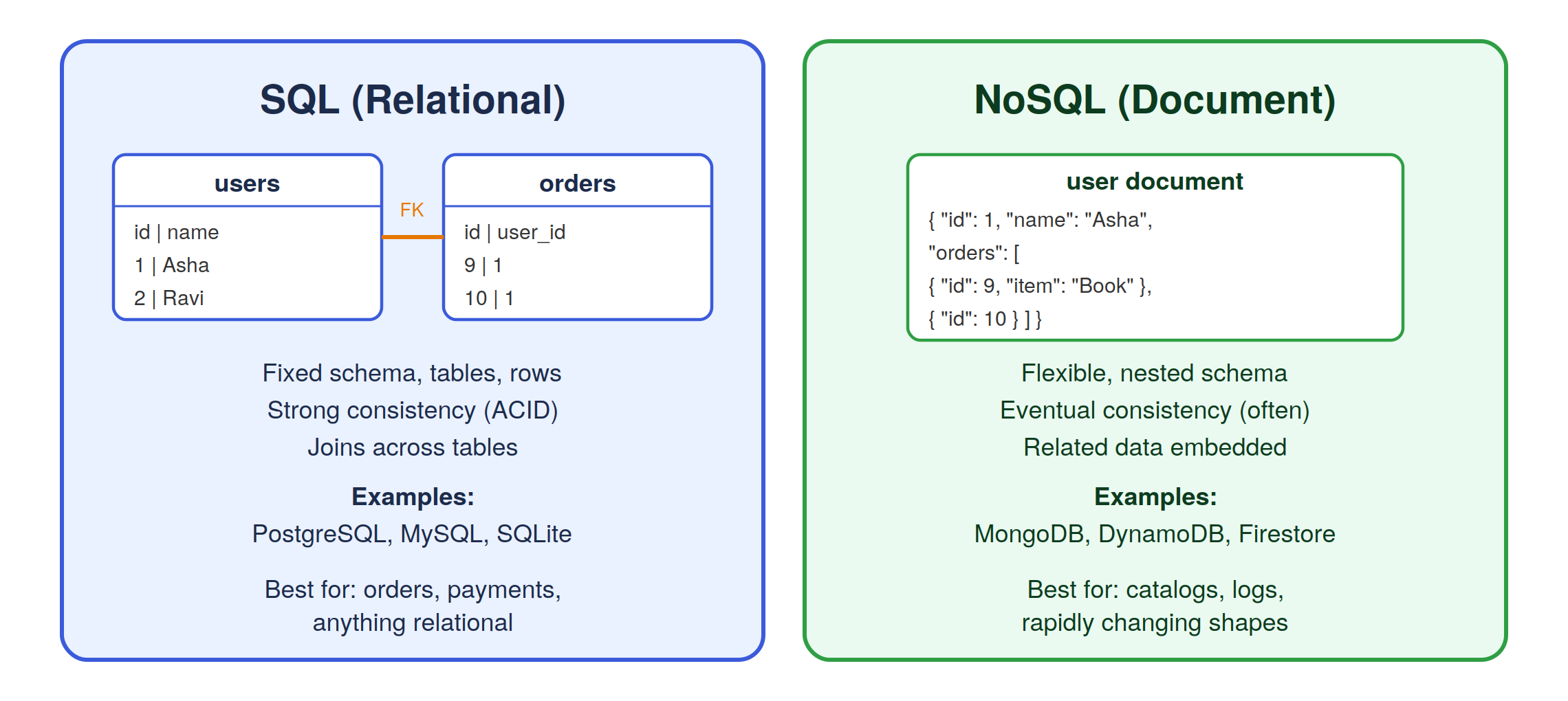
SQL databases (relational):
SQL databases organize data into tables, made up of rows and columns, with a fixed schema. A users table has the same columns for every user. Relationships between tables, a user having many orders, are expressed with foreign keys, and the database can join tables together to answer complex questions in a single query.
Examples: PostgreSQL, MySQL, SQLite, SQL Server.
NoSQL databases (often document-based):
NoSQL is an umbrella term, but the most common style is the document database, where data is stored as flexible, often JSON-like documents rather than rigid rows. A “user” document can carry nested data like an embedded list of recent orders directly inside it, and different documents in the same collection don’t have to share an identical shape.
Examples: MongoDB, DynamoDB, Firestore.
When to choose each approach?
Neither is universally “better”, they trade off differently:
Choose SQL when data is highly relational, consistency matters a lot (financial transactions, inventory counts), and you’ll query the data in many different, unpredictable ways.
Choose NoSQL when the shape of your data varies a lot, you’re optimizing for very high write throughput, or your access patterns are simple and known in advance (fetch this one document by its ID).
Many real systems use both a relational database for orders and payments, and a document store for something like session logs or a rapidly evolving product catalog.
The Problem with Raw Database Queries
Before ORMs existed, developers wrote SQL directly in their application code. It still works today, and plenty of production systems do it. But it comes with real friction as an application grows.
Writing queries manually:
Every time you need data, you write a SQL string by hand:
const result = await db.query(
  "SELECT id, name, email FROM users WHERE id = $1",
  [userId]
);
const user = result.rows[0];
This is fine for one query. It becomes tedious across hundreds of them, especially when the same shape of query “get a user by ID,” “get a user’s orders” is repeated in slightly different forms throughout the codebase.
Repetitive code:
Raw SQL means re-writing the same boilerplate for connecting, parsing results, and converting rows into usable objects, over and over, in every part of the app that touches the database.
Security concerns:
Building SQL strings by concatenating user input directly into a query opens the door to SQL injection, one of the most common and damaging vulnerabilities in web applications. Avoiding it requires discipline: always using parameterized queries, never trusting raw string interpolation. It’s easy to get right once, and easy to get wrong under time pressure.
Maintainability issues:
When the shape of a table changes a column gets renamed, a new one gets added, every raw SQL string that touches that table has to be found and updated. There’s no compiler or type system watching your back; a typo in a column name only shows up when that specific query runs.
Scaling database operations:
As an application grows, so does the need for connection pooling, query batching, caching, and read/write splitting across replicas. Managing all of that by hand, on top of managing raw SQL, is a lot of infrastructure to own directly.
This is the gap ORMs were built to fill.
What Is an ORM?
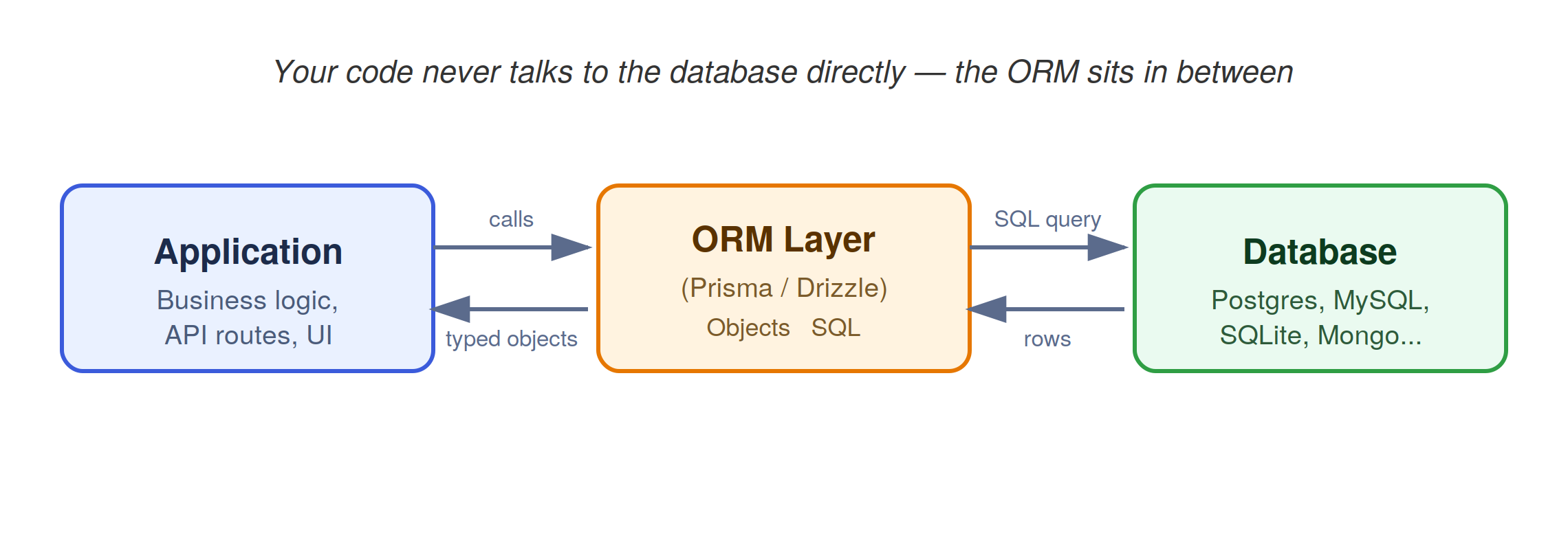
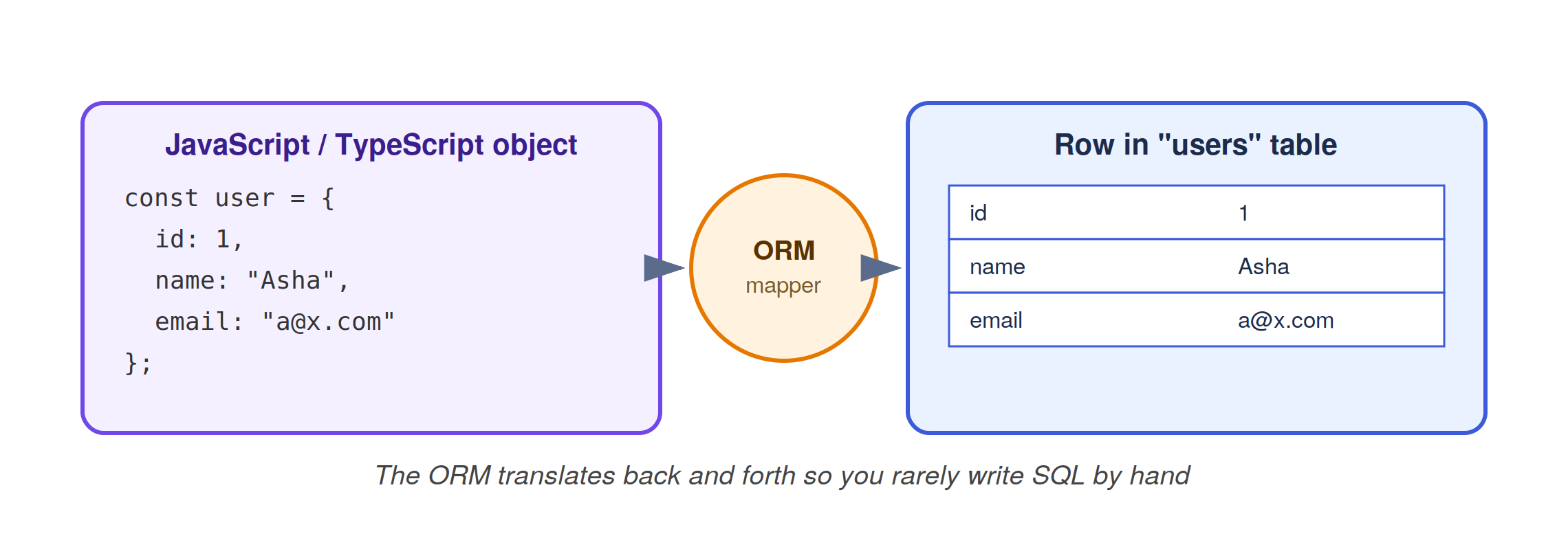
ORM stands for Object-Relational Mapper. At its core, it’s a tool that translates between two different worlds: the objects and classes your application code works with, and the tables and rows your relational database stores.
Why ORMs exist?
Application code is naturally object-oriented (or at least object-shaped): a User with properties like name and email. A relational database stores that same user as a row split across columns. An ORM’s job is to map cleanly between the two, so a developer can write:
const user = await db.user.findUnique({ where: { id: 1 } });
instead of hand-writing a SELECT statement, running it, and manually turning the result into a usable object.
Mapping code objects to database records:
Under the hood, that one line of ORM code is translated into a real SQL query, sent to the database, and the resulting row is converted back into a JavaScript/TypeScript object with the right shape including, often, relationships to other objects (a user’s list of orders, fetched and attached automatically).
Benefits of ORMs:
Less boilerplate — common operations (create, read, update, delete) are one-liners
Type safety — in modern ORMs, your editor knows the exact shape of a
Userand warns you before you misspell a fieldSafer by default — parameterized queries are automatic, cutting down on SQL injection risk
Portability — swapping the underlying database engine is often easier, since your code talks to the ORM, not to database-specific SQL
Built-in migration tooling — most ORMs come with a way to evolve your schema over time in a controlled, versioned way
Tradeoffs of using ORMs:
ORMs aren’t free. Common tradeoffs include:
An abstraction to learn — on top of SQL, you now also need to understand how the ORM’s query API works
Generated queries aren’t always optimal — a convenient ORM method can sometimes produce a less efficient query than one you’d write by hand
Leaky abstraction for complex queries — very advanced SQL (window functions, complex recursive queries) sometimes still needs to be dropped into raw SQL
Another dependency — the ORM itself becomes part of your stack, with its own versioning, bugs, and upgrade cycles
The right way to think about an ORM isn’t as magic that removes the need to understand databases, it’s a productivity tool that automates the repetitive 90% of database work, while still expecting you to understand what’s happening underneath.
Understanding Prisma
Prisma is one of the most widely adopted ORMs in the Node.js and TypeScript ecosystem.
Schema-first development:
Instead of defining your data model purely in code, Prisma asks you to describe it in a dedicated schema file (schema.prisma), using its own concise syntax:
model User {
  id     Int     @id @default(autoincrement())
  name   String
  email  String  @unique
  orders Order[]
}

model Order {
  id     Int   @id @default(autoincrement())
  total  Float
  userId Int
  user   User  @relation(fields: [userId], references: [id])
}
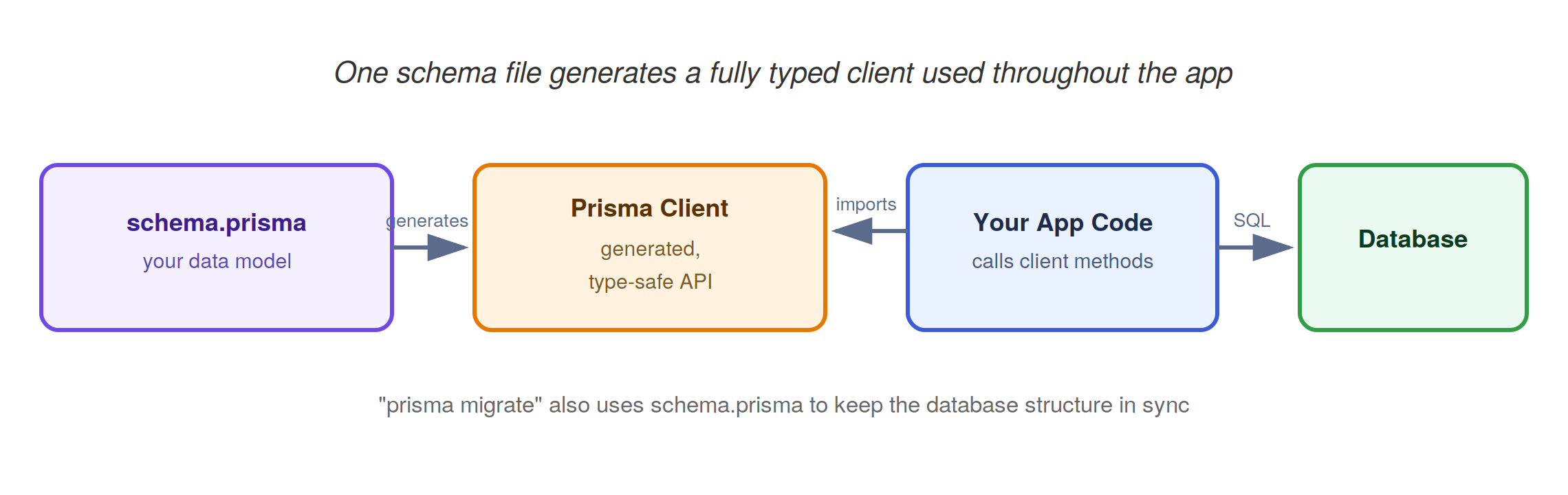
From this single file, Prisma generates a fully type-safe client for your application code, and can also generate the database migrations needed to create or update the actual tables.
Type-safe database access:
Because the client is generated from your schema, every query is checked against real field names and types at compile time. Autocomplete in your editor reflects your actual data model, if a field doesn’t exist, your code won’t compile.
Migrations:
Prisma’s migration workflow (prisma migrate) compares your schema file to the current database state, generates a SQL migration file representing the difference, and lets you review it before applying it keeping schema history versioned alongside your application code.
Developer experience benefits:
Prisma is often praised for:
A very approachable, readable schema syntax
Prisma Studio, a visual GUI for browsing and editing data
Strong documentation and a large community
An intuitive query API that closely mirrors how you’d describe the data you want in plain English
Prisma ecosystem overview:
Beyond the core ORM, Prisma has grown into a broader set of tools: a hosted data platform, connection pooling for serverless environments, and integrations across most popular frameworks. This ecosystem is part of why it’s become a default choice for many teams starting new TypeScript projects.
Understanding Drizzle
Drizzle is a newer ORM that takes a noticeably different philosophy from Prisma.
SQL-first philosophy:
Where Prisma introduces its own schema language, Drizzle defines your data model in plain TypeScript, deliberately staying close to how SQL itself is structured:
import { pgTable, serial, text, integer } from "drizzle-orm/pg-core";

export const users = pgTable("users", {
  id: serial("id").primaryKey(),
  name: text("name").notNull(),
  email: text("email").notNull().unique(),
});

export const orders = pgTable("orders", {
  id: serial("id").primaryKey(),
  total: integer("total").notNull(),
  userId: integer("user_id").references(() => users.id),
});
Queries in Drizzle also read much closer to SQL than Prisma’s more abstracted API:
const result = await db
  .select()
  .from(users)
  .where(eq(users.id, 1));
Type safety:
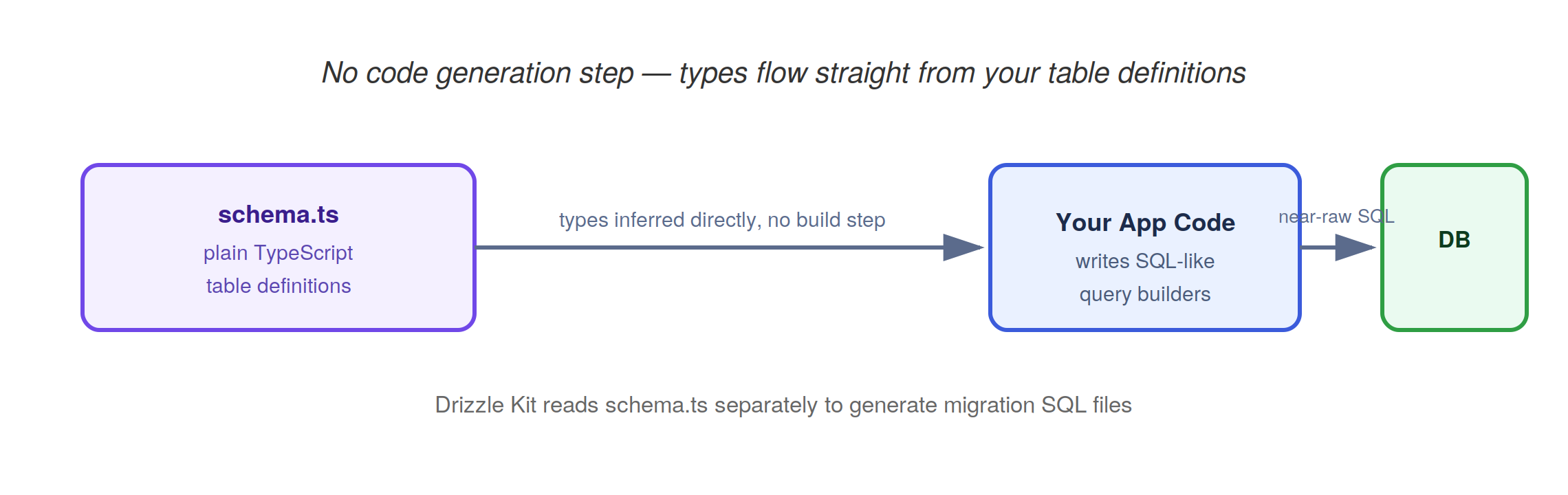
Drizzle infers TypeScript types directly from your table definitions, without a separate code-generation step. Because there’s no generated client to run, types are available immediately as soon as the schema file is saved.
Lightweight architecture:
Drizzle is designed as a thin layer over SQL rather than a full framework. It has a small runtime footprint, works well in serverless and edge environments where cold-start time matters, and avoids extra background processes.
Drizzle vs. traditional ORMs:
Drizzle deliberately resists hiding SQL behind heavy abstraction. Its pitch is that if you already know SQL, you shouldn’t have to learn a large new abstraction on top of it you should get type safety and convenience while still writing something that closely resembles the query that will actually run.
Prisma vs. Drizzle
Both are strong, actively maintained tools, and the “better” choice depends on context rather than a universal winner.
| Prisma | Drizzle | |
|---|---|---|
| Developer experience | Very beginner-friendly, readable schema DSL, Prisma Studio GUI | SQL-like, minimal magic, feels natural to those who already know SQL |
| Learning curve | Gentle — plain-English-like query API | Slightly steeper if you don’t already know SQL, easier if you do |
| Performance | Adds a query engine layer (historically a separate binary; lighter in newer versions); a bit more overhead | Very close to raw SQL performance, minimal runtime overhead |
| Migration workflow | Built-in, schema-diffing migration generator | Also has a migration tool (Drizzle Kit), generates SQL directly |
| Type safety | Generated types from a build step | Inferred types with no generation step, types update instantly |
| Ecosystem maturity | Older, larger community, more integrations and learning material | Newer, growing fast, smaller but active community |
| Production use | Widely used across startups and larger companies alike | Growing adoption, especially in serverless/edge-first projects |
The honest tradeoff: Prisma optimizes for approachability and a polished all-in-one experience. Drizzle optimizes for staying close to SQL and minimizing overhead. Teams that value guardrails and tooling (like a visual data browser) tend to gravitate to Prisma. Teams that want full control over the exact SQL being run, or that are deploying to environments sensitive to startup time and bundle size, often prefer Drizzle. Neither choice is a mistake they represent different bets on where abstraction helps versus where it gets in the way.
Database Migrations
Why migrations are needed?
An application’s data model is never final. New features need new fields; refactors need renamed columns; growth needs new tables. But a production database already has real data in it, you can’t just delete it and start over every time the schema changes.
Schema evolution:
A migration is a small, incremental change to the database schema, “add a phone column to users,” “create a payments table” expressed as an explicit, reviewable step rather than an ad hoc manual edit.
Versioning database changes:
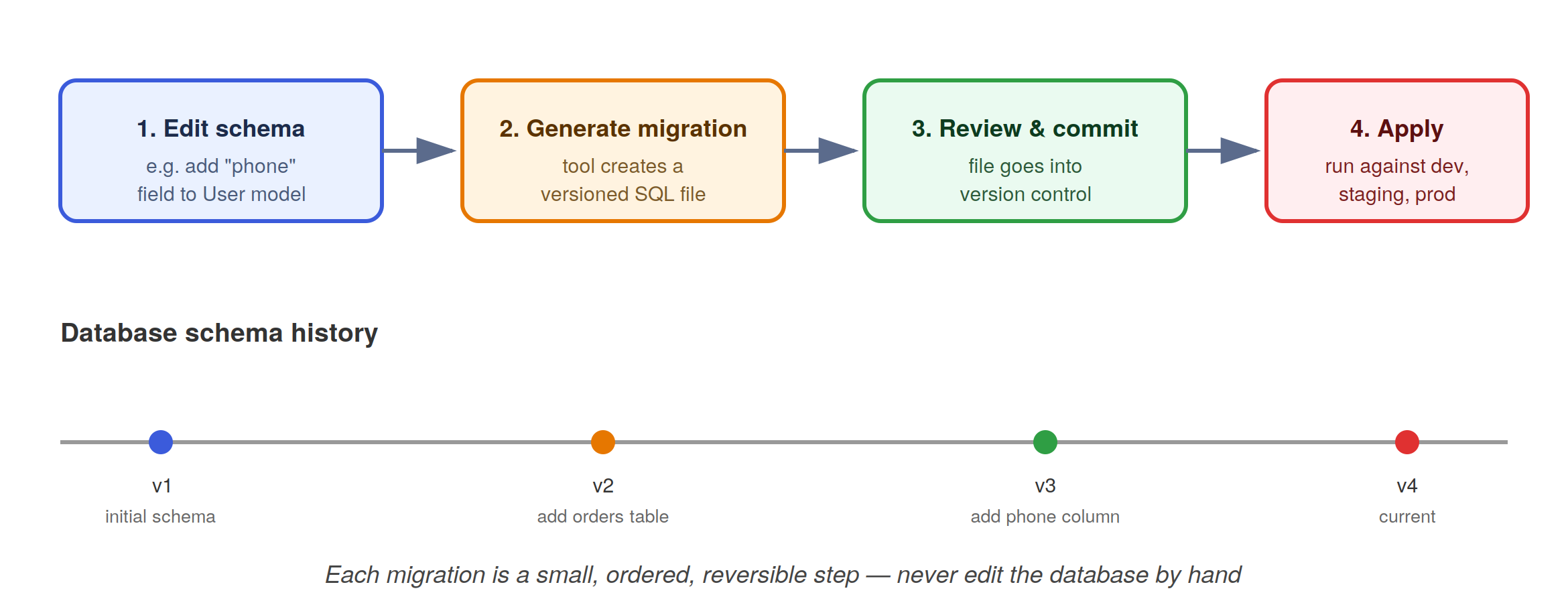
Migrations are typically stored as ordered files in version control, the same way application code is. This means the database’s structure has a history, can be reviewed in a pull request, and can be applied consistently across every environment a developer’s laptop, a staging server, and production in the same order.
Migration workflows:
Both Prisma and Drizzle follow a similar high-level pattern:
Change the schema definition in code
Generate a migration file representing the difference
Review the generated SQL
Commit it to version control
Apply it to each environment as part of deployment
Common migration challenges:
Data loss risk — dropping or renaming a column can silently discard data if not handled carefully
Downtime — some schema changes lock tables briefly, which matters at scale
Conflicting migrations — two developers changing the schema at the same time can create migration files that don’t merge cleanly
Rollbacks — undoing a migration that already ran against production data is often harder than applying it in the first place
Designing Data Models
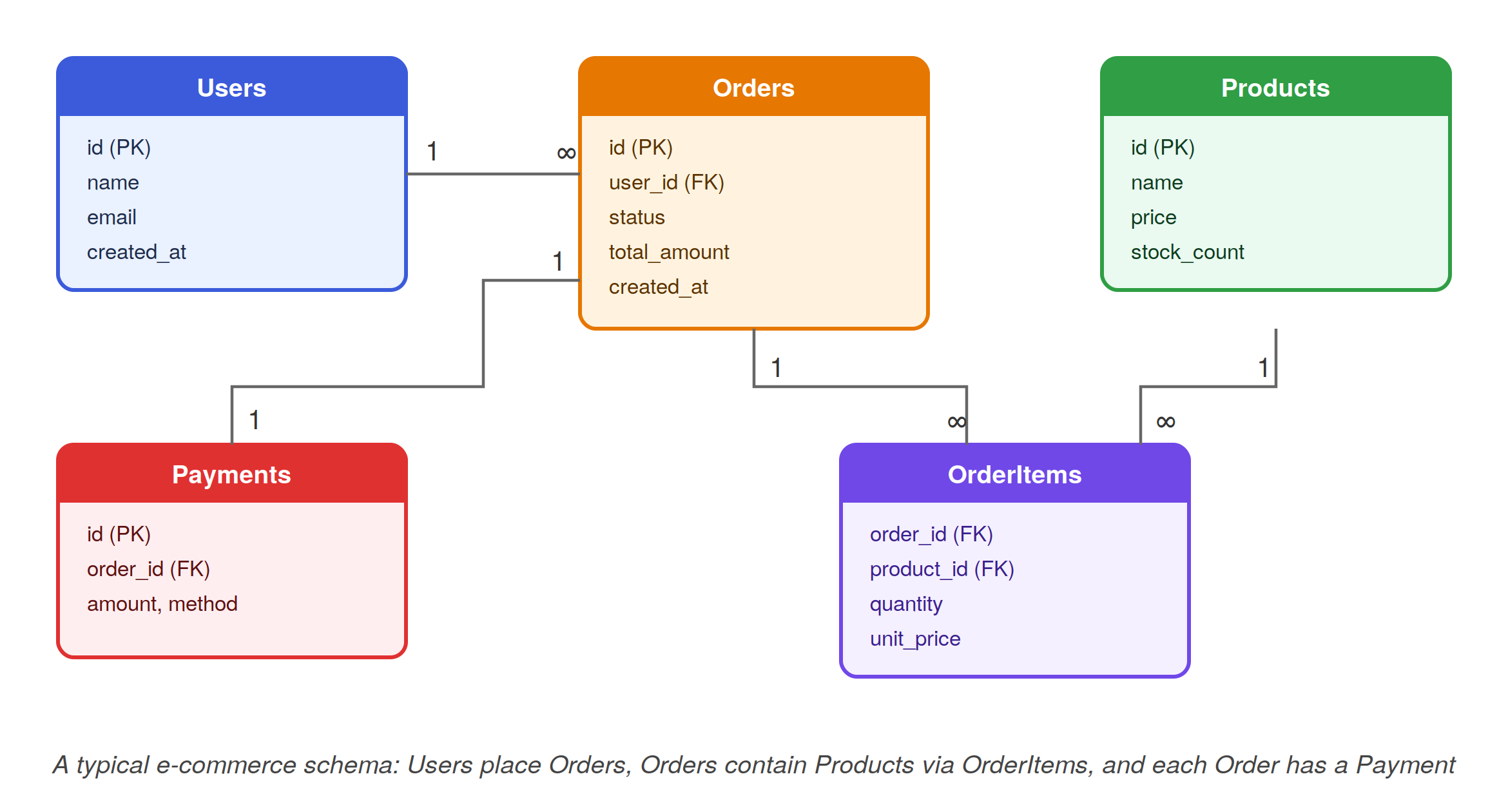
Good schema design starts with identifying entities (the “nouns” of your system — User, Order, Product) and the relationships between them.
One-to-One Relationships:
Each record in one table relates to exactly one record in another. A User might have exactly one Profile containing extended bio information that’s kept separate for performance or privacy reasons.
One-to-Many Relationships:
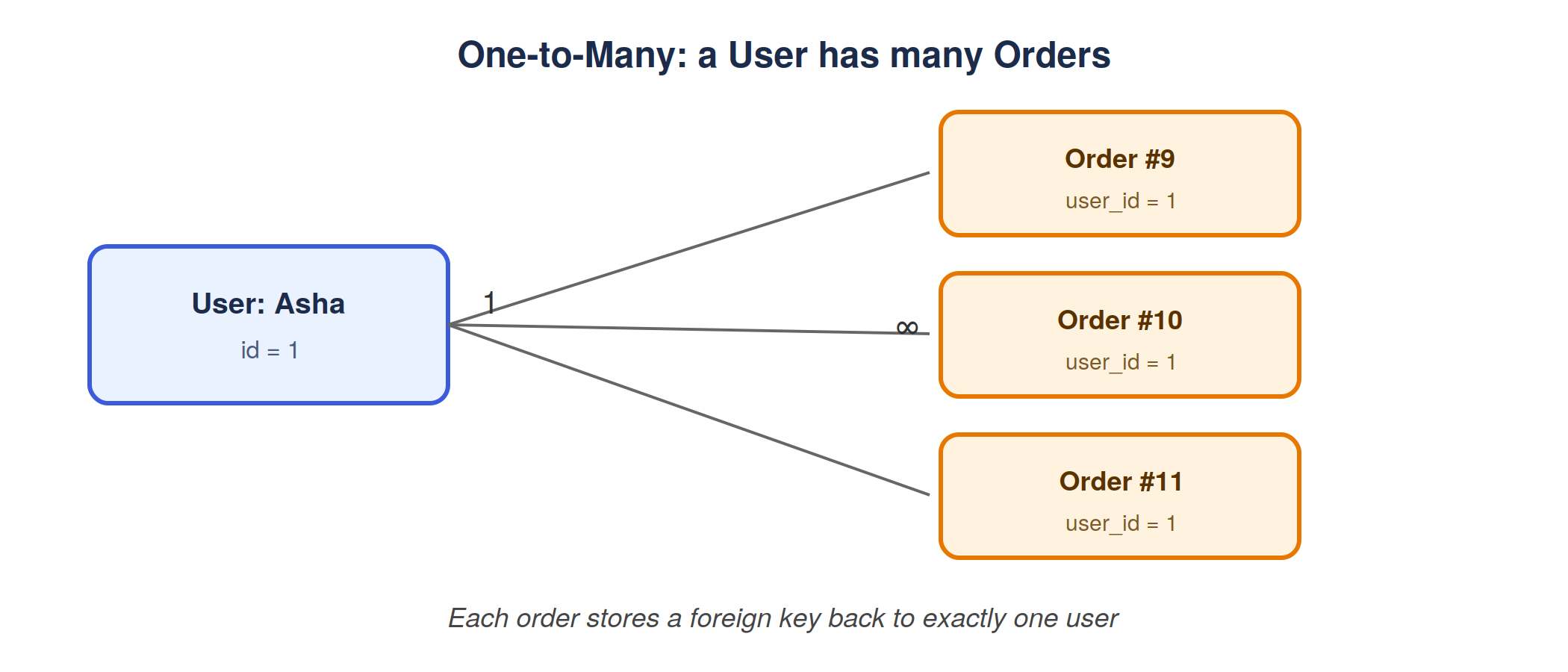
The most common relationship type: one record relates to many records in another table. One User places many Orders. Each Order, though, belongs to exactly one User.
Many-to-Many Relationships:
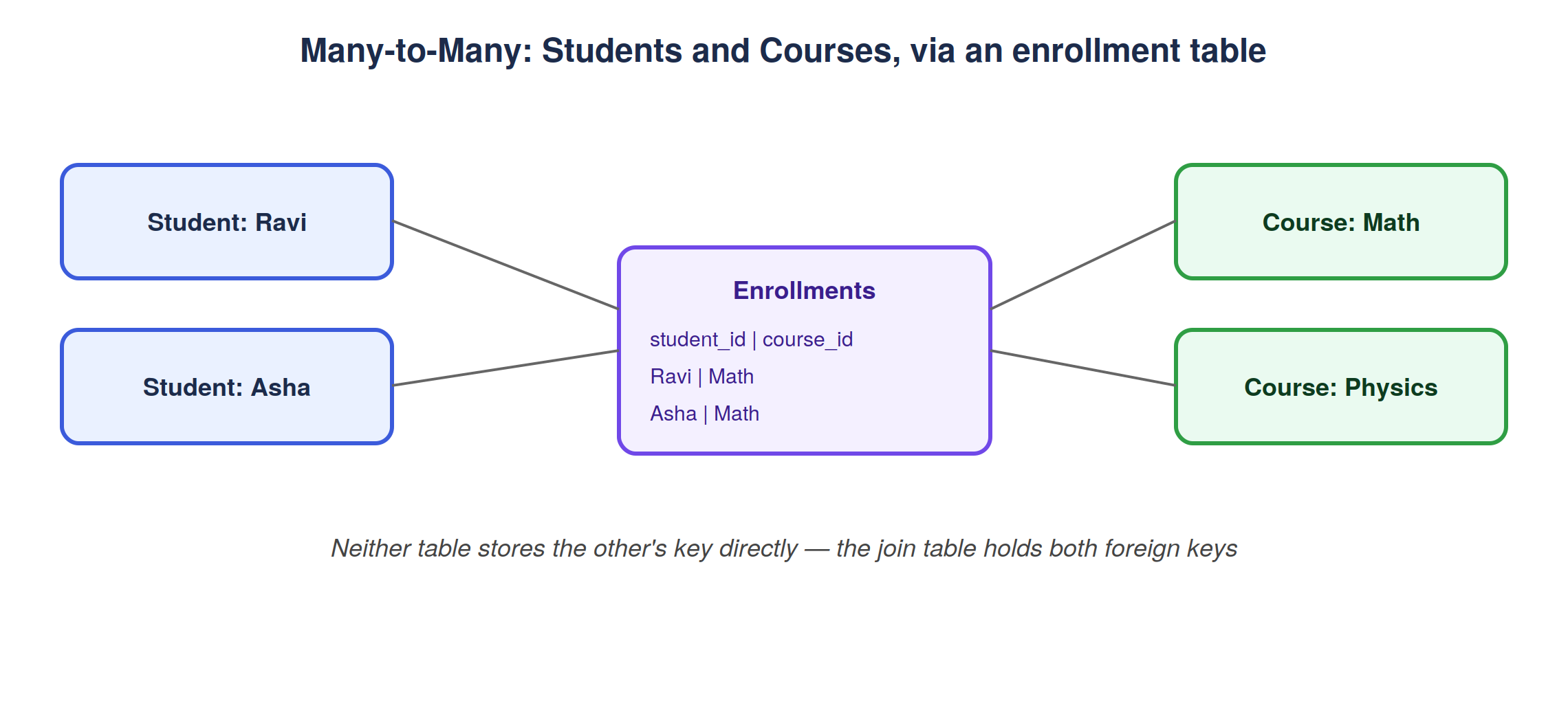
Both sides can relate to many records on the other side. A Student can enroll in many Courses, and a Course has many Students. This can’t be represented with a single foreign key on either table — it requires a join table (often called an “enrollment” or “junction” table) that stores pairs of foreign keys.
Modeling real-world systems:
Consider three familiar platforms:
E-commerce: Users place Orders, Orders contain Products through an OrderItems join table, and each Order has one Payment (see the ERD earlier in this post).
Social media: Users author Posts (one-to-many), Users follow other Users (many-to-many, self-referencing), and Posts have many Comments (one-to-many).
Blogging platform: Authors write Posts (one-to-many), Posts have many Tags and Tags apply to many Posts (many-to-many), and Posts have many Comments (one-to-many).
The same handful of relationship patterns, one-to-one, one-to-many, many-to-many, show up again and again, just applied to different entities.
Choosing the Right Tool
There’s no single correct answer for every project, the right choice depends on the shape of the team and the system.
Startup Projects:
Speed of iteration usually matters most. Prisma’s readable schema, generated client, and Studio GUI tend to help small teams move fast without needing deep SQL expertise from day one. Drizzle is also a strong fit for startups building on serverless/edge platforms, where its lighter runtime pays off immediately.
Enterprise applications:
Larger organizations often value maturity, community size, extensive documentation, and predictable long-term support, areas where Prisma’s larger ecosystem currently has an edge, though Drizzle is maturing quickly.
Team experience:
A team with strong SQL fundamentals may prefer Drizzle’s closeness to real SQL and its lack of hidden behavior. A team newer to databases, or with a mix of experience levels, may benefit more from Prisma’s guided, discoverable API.
Long-term maintenance:
Consider who will maintain this schema in two or three years. Generated clients (Prisma) offer strong guardrails against drift between code and database. A SQL-first approach (Drizzle) offers less abstraction to go wrong, at the cost of relying more on the team’s own SQL discipline.
Performance requirements:
For most applications, the performance difference between a well-used ORM and raw SQL is negligible next to network latency and query design. But for very high-throughput, latency-sensitive, or resource-constrained (serverless/edge) systems, Drizzle’s lighter overhead can matter more directly.
Conclusion
Every application, from a weekend side project to a large e-commerce platform, ultimately comes back to the same question this post opened with: where does the data live, and how does the code get to it safely and reliably? Databases answer the “where.” ORMs like Prisma and Drizzle answer the “how”, each with a different philosophy about how much abstraction belongs between your code and your SQL.
Neither tool is “the right answer” in the abstract. They’re both productivity tools built on the same underlying relational concepts, tables, rows, foreign keys, migrations just with different opinions about developer experience versus closeness to SQL. Understanding those underlying concepts first is what makes either tool easy to reason about, rather than something that feels like magic.


